


Bowling Crew — 3D bowling game
4.642.19K Reviews
App Specs
- Version
- 1.93.1
- Updated On
- License
- Free
- Downloads
- 10,000,000+
- Developer
- Kitomy Limited
- Categories
- Sports
- Platform
- Android, iOS
Screenshots

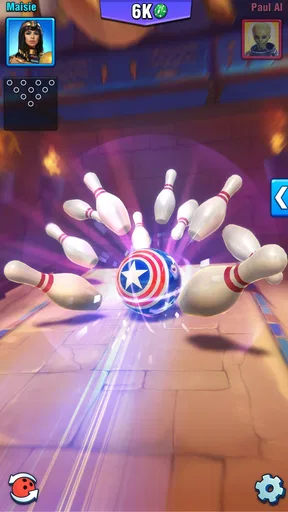
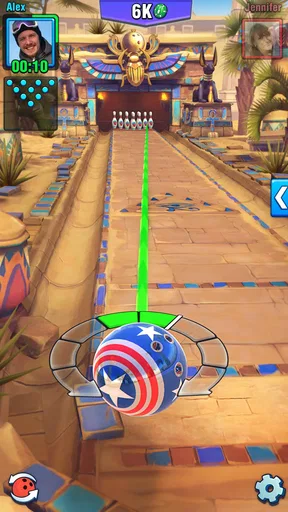
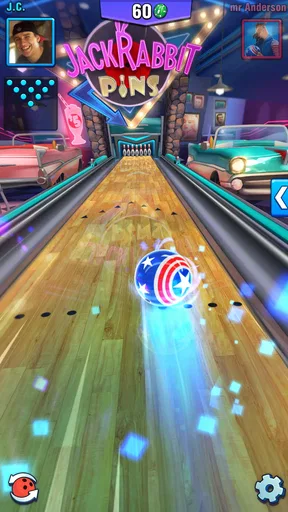
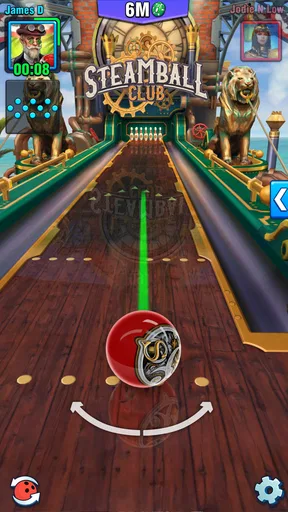
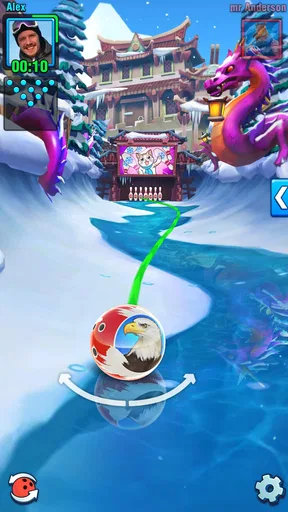

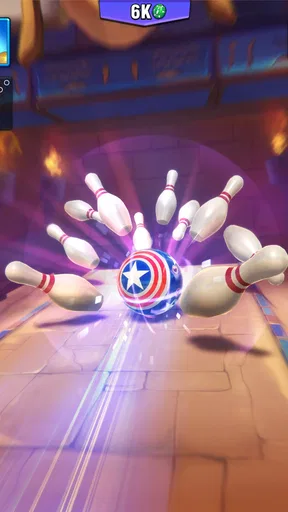
 Analysis by AppCompare
I like mobile sports games best when they let me get into a match quickly, without asking me to learn a complicated control scheme first. Bowling Crew — 3D bowling game has that pick-up-and-play appeal: bowling is familiar, and a swipe-and-flick approach makes the basic action easy to understand. The important question is whether it stays enjoyable once the novelty wears off. For me, its appeal comes from the blend of short bowling sessions, competition, and room to refine how I play, though that competitive focus will not suit everyone.
Quick sessions, with a learning curve underneath
Bowling Crew is a sports game from Levitating Pot Limited. It is free to download, rated Everyone, and has a 4.6 average from around 428,000 ratings. More than 10 million installs point to a broad audience, but those figures matter less than the practical fit: this is a good option when I want a focused game rather than a long, story-led experience. It was released in 2018, and version 1.84 is the current version.
The opening tutorial is intended to get the basic motion across quickly. That does not mean every shot will immediately feel predictable. Bowling depends on controlling direction and pace, and the same simple gesture can take practice before it becomes consistent. I would treat early matches as a chance to learn the feel of the controls rather than as proof that I am good or bad at the game. Once I slow down and make deliberate shots instead of flicking in a hurry, it is easier to judge what I need to adjust next time.
How the competitive loop holds up
The main draw is playing against other people in real time. That gives each frame a little more tension than bowling alone against a fixed target: I am not just trying to improve a score, but also trying to make good decisions while someone else is progressing through the match. Tournaments and challenges add variety, while ranks give competitive players a reason to keep working on their consistency. I would recommend this side of the game to anyone who enjoys quick head-to-head contests and does not mind that winning can take practice.
There is also a strategic layer in the bowling balls, which can be customized with different designs and abilities. I would not treat a new ball as an automatic shortcut to better play. It is more useful to think about equipment as one part of a setup and pay attention to whether the ball’s behavior suits the way I aim and release. A sensible habit is to change one thing at a time; if I swap equipment and alter my shot technique together, it becomes difficult to tell which change helped. That small bit of discipline makes progression feel more like learning than guessing.
Social play and the changing lanes
Playing with friends gives the game a more personal reason to return. Chat and opponent interaction can make a match feel lively, especially when both players are taking the competition in good humor. I would still choose the social side based on the people I am playing with: if I want a quiet solo break, chat and a live opponent are not necessarily a benefit. The daily rewards and challenges offer another reason to check in, but I find it healthier to treat them as optional extras rather than a schedule I have to keep up with.
The lanes’ different visual themes also help sessions feel less repetitive. A tropical setting and a neon-lit alley give the same basic sport a different atmosphere, and unlocking locations can be satisfying if I like having visible goals. The trade-off is that visual variety does not change the fact that the core activity remains bowling. If I need a game that constantly introduces new kinds of play, this may feel narrow; if I like improving at one recognizable activity, that focus is a strength.
Worth Reading Before You Choose

EA SPORTS FC Mobile 26 Is a Bigger Football Game, but It Takes Time

Flipboard Shows What News Apps Must Do Beyond the Feed

Switching to Android Auto Means Rethinking Your Driving Routine

Google Calendar Makes a Crowded Week Easier to Manage

Ludo King Makes the Most of the Minutes Between Plans

Baby Panda World Brings Quick Play to Modern Phones, but Its Game Library Feels Busy
Rolling into the Game
From the moment you launch Bowling Crew — 3D bowling game, you're greeted with vibrant graphics and smooth animations that really bring the lanes to life. The interface is intuitive and user-friendly, perfect for both seasoned bowlers and newbies. You start off with a quick tutorial that gets you rolling in no time. I was really impressed with how seamless the controls felt, just a swipe and a flick, and you're knocking down pins like a pro!
Gameplay that Strikes Gold
The game offers a variety of modes that keep things interesting. You can play against other players in real-time matches, which is a total blast. I found myself getting pretty competitive, especially as I climbed up the ranks. There are also tournaments and challenges that provide a nice mix of difficulty and fun. One of the coolest features is the ability to customize your bowling ball with different designs and abilities, adding a layer of strategy to your game.
What really sets this game apart is the attention to detail. The physics feel realistic, and each lane has its unique spin. I mean, who knew bowling could be this captivating? The developers have nailed the balance between a casual game and a competitive sport, making it appealing to a wide audience.
Spare a Thought for the Features
One of the highlights of the app is its social aspect. You can connect with friends, and there's a chat feature that allows you to interact with your opponents. I had a great time trash-talking (in good spirit, of course) during matches. Plus, the daily rewards and challenges keep you coming back for more.
The graphics are another strong point. Each lane is beautifully crafted, offering a new atmosphere and experience. From tropical beaches to neon-lit alleys, the variety keeps the game fresh and exciting. I found myself looking forward to unlocking new locations just to see what they’d look like.
Speed, stability, and device fit
For a game built around brief matches, the pace matters as much as the bowling itself. I would expect the familiar controls to make it quick to get from opening the game to taking a shot, but a live match is still a commitment: I need a reasonably steady stretch of attention, not just a second to tap the screen. That makes it a better fit for a short break when I can finish a game than for moments when I may have to put my phone away without warning.
In heavier use, such as playing several matches and moving between challenges, the main practical demand is continued attention rather than a complicated routine. I would take a moment between games to check the next activity and adjust my approach, instead of rushing straight into another contest. This also helps avoid confusing an inconsistent result with a problem in the controls: bowling rewards repeatable motions, and hurried play makes it harder to tell whether a shot went wrong because of aim, timing, or a deliberate change.
As with any real-time game, the quality of a competitive session depends partly on the connection and the device’s ability to keep the experience responsive. I would avoid starting a close match if I already know my connection is unreliable or my phone is struggling with other demanding tasks. If a session is interrupted, I would first reopen the game and see whether it returns me to play; I would not assume that every match can be recovered or that progress is automatically saved in a particular way. That is a sensible precaution for any match where the result matters to me.
The game is free to download, with optional in-app purchases ranging from $0.99 to $149.99 per item. That broad spread is worth keeping in mind before spending: I would decide on a personal limit first and treat purchases as optional, not as a requirement for enjoying the basic bowling loop. If I am mainly curious, I can begin without paying and see whether I actually enjoy the pace and competitive structure. The minimum operating system requirement is version 7.0, so checking that before installation is a simple way to avoid an avoidable compatibility surprise.
Who will enjoy it, and who may prefer another game
I think it works particularly well for someone who likes sports games but wants a compact, repeatable activity rather than a full simulation. It also suits friends who enjoy comparing results and adding a little friendly rivalry to a casual evening. A realistic use case is waiting for a meal or taking a break between errands: one match can provide a clear beginning and end, while the challenges give me something to work toward if I choose to stay longer.
Compared with a solitary bowling game focused mostly on practicing shots, the appeal here is the live competition, social interaction, and progression. Compared with a broad sports collection, it offers a narrower experience centered on one sport, which can make it easier to return to but less varied over time. I would choose a more relaxed, offline-oriented alternative if I wanted to practice without the pressure of another player, or a game with several sports if I expected to switch activities often. Bowling Crew is strongest when I want bowling specifically and enjoy trying to improve against other people.
One useful way to keep the game from becoming frustrating is to separate experimentation from competition. I can test a different ball or a new release approach when the result does not matter much, then use the setup that feels dependable in a closer match. Another is to set a stopping point before chasing a rank or reward; short rounds make it easy to say “one more,” even when I am no longer playing carefully. These are small habits, but they help keep the competitive loop fun instead of turning every loss into a reason to spend more time or money.
Final Frame
In conclusion, Bowling Crew — 3D bowling game is a fantastic app that brings the joy of bowling right to your device. Whether you're in it for the competition or just looking to unwind, this game has something for everyone. It’s easy to pick up but challenging enough to keep you engaged. So, if you’re ready to roll, download the app and let the good times bowl!
My recommendation comes with one qualification: choose it for quick, social bowling and gradual improvement, not for a deep sports simulation or a guaranteed low-pressure solo experience. I like that the familiar action is easy to start while still leaving room to work on consistency, and the themed lanes give progression a visible payoff. If that balance sounds appealing, it is worth trying; if live contests, repeated matches, or optional spending would make the experience feel like a chore, a quieter bowling game is likely a better fit.
Pros
- Stunning 3D graphics enhance gameplay.
- Quick and easy to learn for beginners.
- Variety of themed lanes adds excitement.
- Multiplayer mode for competitive fun.
- Regular updates with new challenges.
Cons
- In-app purchases can be pricey.
- Requires constant internet connection.
- Ads may interrupt gameplay frequently.
- Battery consumption is relatively high.
- Limited customization options for characters.
FAQs for Bowling Crew — 3D bowling game
What is Bowling Crew and how does it differ from other bowling games?
Bowling Crew is a 3D bowling game that offers a unique multiplayer experience with real-time matches against players worldwide. Unlike traditional bowling games, it features dynamic environments, a variety of lanes, and customizable balls that add strategic depth to gameplay. The game also includes a progression system that rewards skill and dedication.
Is Bowling Crew free to play, and are there in-app purchases?
Yes, Bowling Crew is free to download and play on both Android and iOS devices. However, it does offer in-app purchases for players who wish to enhance their experience. These purchases can include special bowling balls, lane customizations, and currency packs, which can accelerate progress but are not necessary to enjoy the game.
What are the system requirements to play Bowling Crew on my device?
To play Bowling Crew, you’ll need a device running Android 5.0 or higher, or iOS 10.0 or later. The game is optimized for both phones and tablets, providing a seamless experience. Ensure you have adequate storage space and a stable internet connection for the best performance and to enjoy real-time multiplayer matches.
Can I play Bowling Crew offline, or is an internet connection required?
Bowling Crew requires an active internet connection to play, as it focuses on real-time multiplayer matches against other players. The game's social features, such as leaderboards and challenges, also necessitate internet access to function properly. Offline play is not supported, so ensure you have a stable connection when playing.
How does the progression system work in Bowling Crew?
The progression system in Bowling Crew involves earning trophies and unlocking new lanes as you win matches. Players can improve their skills by upgrading bowling balls and participating in weekly challenges. Success in matches earns you rewards that contribute to your progression, allowing you to compete in higher leagues and against more skilled players.


